

Restaurant & Hospitality Inventory Counting Has Never Been Easier
Physical inventory is essential to controlling food and beverage costs—but it should not consume hours of your team's time every week or month.
Physical inventory is essential to controlling food and beverage costs—but it should not consume hours of your team's time every week or month.
Whether you operate a restaurant, country club, hotel, resort, bar, senior living community, commissary, or any other hospitality business, NxtEdge makes physical inventory faster and easier with barcode inventory counting, mobile technology, and pricing that automatically updates from your invoices.
Instead of searching through count sheets, manually updating product costs, and entering inventory after the count is finished, your team can scan, count, and move on.
The result? Cut inventory counting time by up to 50%.
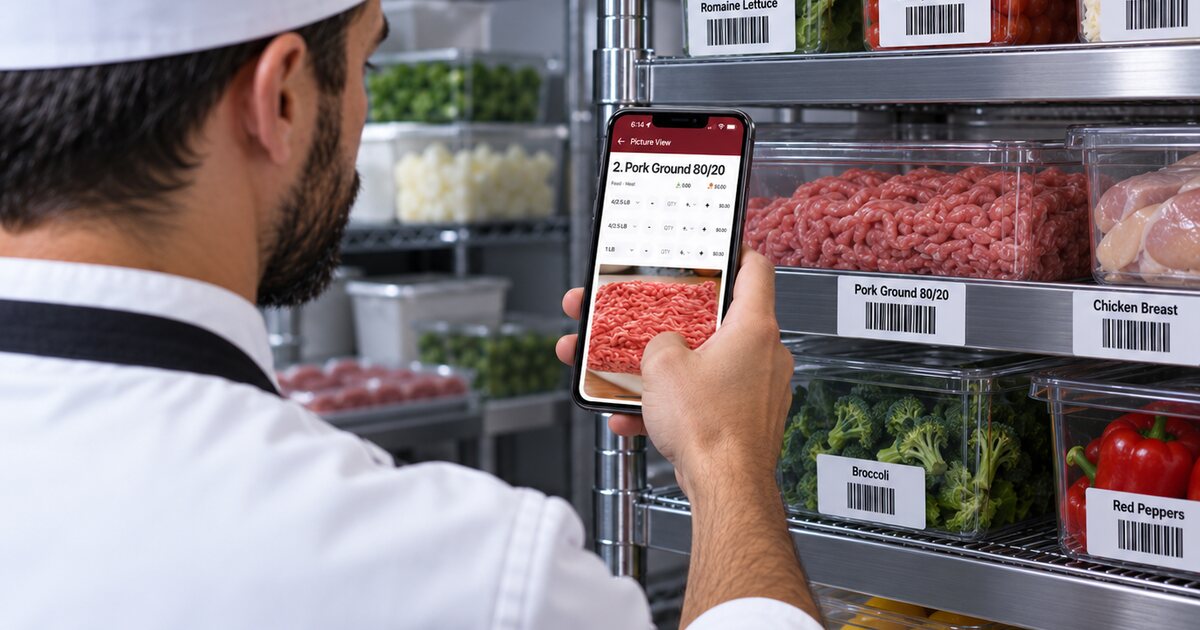
Cut Inventory Counting Time by Up to 50% With Barcode Inventory
Traditional restaurant and hospitality inventory counting can be a slow process. Your team walks through coolers, freezers, dry storage, liquor rooms, and other storage areas looking for products and recording quantities.
With NxtEdge's barcode inventory system, your team can scan an item, enter the quantity on a mobile device, and immediately move to the next product.
For operations with multiple storage areas or hundreds of inventory items, those saved seconds can add up quickly.
NxtEdge supports two different types of barcodes.
Use the Manufacturer's Existing Barcode
If a product already has a manufacturer barcode, you can associate that barcode with the product in NxtEdge.
Once it is set up, simply scan the product during inventory to identify the item and enter the quantity.
There is no need to create another barcode when the one you need is already on the product.
Generate Your Own NxtEdge Barcodes
Sometimes the manufacturer's barcode is not easily accessible—or putting a barcode directly on the shelf simply makes more sense.
NxtEdge can automatically generate a unique barcode for your inventory products.
Barcodes can be generated one item at a time or for an entire product category, making it easy to barcode a liquor room, walk-in cooler, dry storage area, or your entire operation.
Put the Barcode Where You Actually Count
One of the biggest advantages of generating your own inventory barcodes is that the barcode does not have to be attached to the product.
It can be placed directly on the shelf, bin, rack, or storage location where your team counts that item.
Think about a walk-in cooler. Instead of picking up every case or container looking for the manufacturer's barcode, your team can move down the shelves scanning the NxtEdge barcode positioned directly in front of each product.
Scan. Enter the quantity. Move to the next item.
It is a simple change that can dramatically speed up physical inventory.
Print Your Barcodes Your Way
NxtEdge gives you flexibility in how you create and use your inventory barcodes.
Barcodes can be printed on standard adhesive labels and placed directly on shelves, bins, racks, or other storage locations.
For a more permanent solution, barcodes can also be generated as a PDF and professionally printed, cut, and laminated. This is a great option for coolers, freezers, liquor rooms, dry storage areas, and other high-use locations.
The goal is simple: put the barcode where your team actually counts the product.
Use a Bluetooth Barcode Scanner With Your Phone
You do not need expensive proprietary scanning equipment.
Pair a Bluetooth barcode scanner with your phone or mobile device, scan the barcode, enter the quantity, and move on to the next item.
This gives your team a simple, mobile way to move through storage areas and complete inventory faster.
Combined with NxtEdge's mobile inventory system, barcode scanning can help cut inventory counting time by up to 50%.
Your Inventory Pricing Is Already Updated
Counting faster is only part of the equation.
A fast inventory is not very useful if the prices behind it are outdated.
That is why NxtEdge connects invoice automation and inventory management.
As invoices are received in NxtEdge, product costs automatically update based on the actual prices you are paying your vendors.
Depending on your setup, inventory can be valued using FIFO or Last Invoice Price.
There is no need to manually update inventory costs every time a vendor changes a price. When it is time to count, your quantities and purchasing data are already working together.
From Invoice to Inventory to Food Cost
An invoice should not just be something accounting pays.
Every invoice contains valuable information about what you purchased, what you paid, and what those products should be worth when you count them.
Receive Invoice → Update Product Cost → Count Inventory → Calculate Inventory Value → Review Cost of Goods Sold
This creates one connected workflow instead of separate spreadsheets and disconnected systems.
Your inventory is no longer just a month-end task. It becomes part of your ongoing food and beverage cost-control process.
Built for Restaurants, Country Clubs & Hospitality Operations
Every hospitality operation counts inventory differently.
- Restaurants may have a walk-in cooler, freezer, dry storage, prep areas, and a bar.
- Country clubs may need to count food and beverage inventory across multiple kitchens, restaurants, banquet areas, beverage storerooms, halfway houses, pool cafés, and other outlets.
- Hotels and resorts may have restaurants, bars, banquet operations, room service, kitchens, and multiple storage locations.
NxtEdge's hospitality inventory management software is designed to support these different environments while keeping purchasing, invoices, inventory, and food cost connected.
Whether you are managing restaurant inventory, country club food and beverage inventory, hotel inventory, resort inventory, bar inventory, or a multi-location hospitality operation, the goal is the same:
Count faster. Keep pricing current. Know what you have. Understand what it costs.
Stop Spending Hours Counting Inventory
Physical inventory will always require someone to count what is actually on the shelf.
But the process surrounding that count does not need to be difficult.
Barcode scanning eliminates much of the searching. Mobile counting eliminates paper count sheets. Automated invoice pricing eliminates manual price updates. And connecting purchasing, invoices, inventory, and COGS gives management better information once the count is complete.
With NxtEdge, you can cut inventory counting time by up to 50% while improving visibility into your food and beverage inventory and costs.
Counting inventory has never been easier.
Frequently Asked Questions
See Faster Inventory Counting in Action
See how barcode scanning, mobile counts, and invoice-connected pricing can simplify physical inventory across your operation.